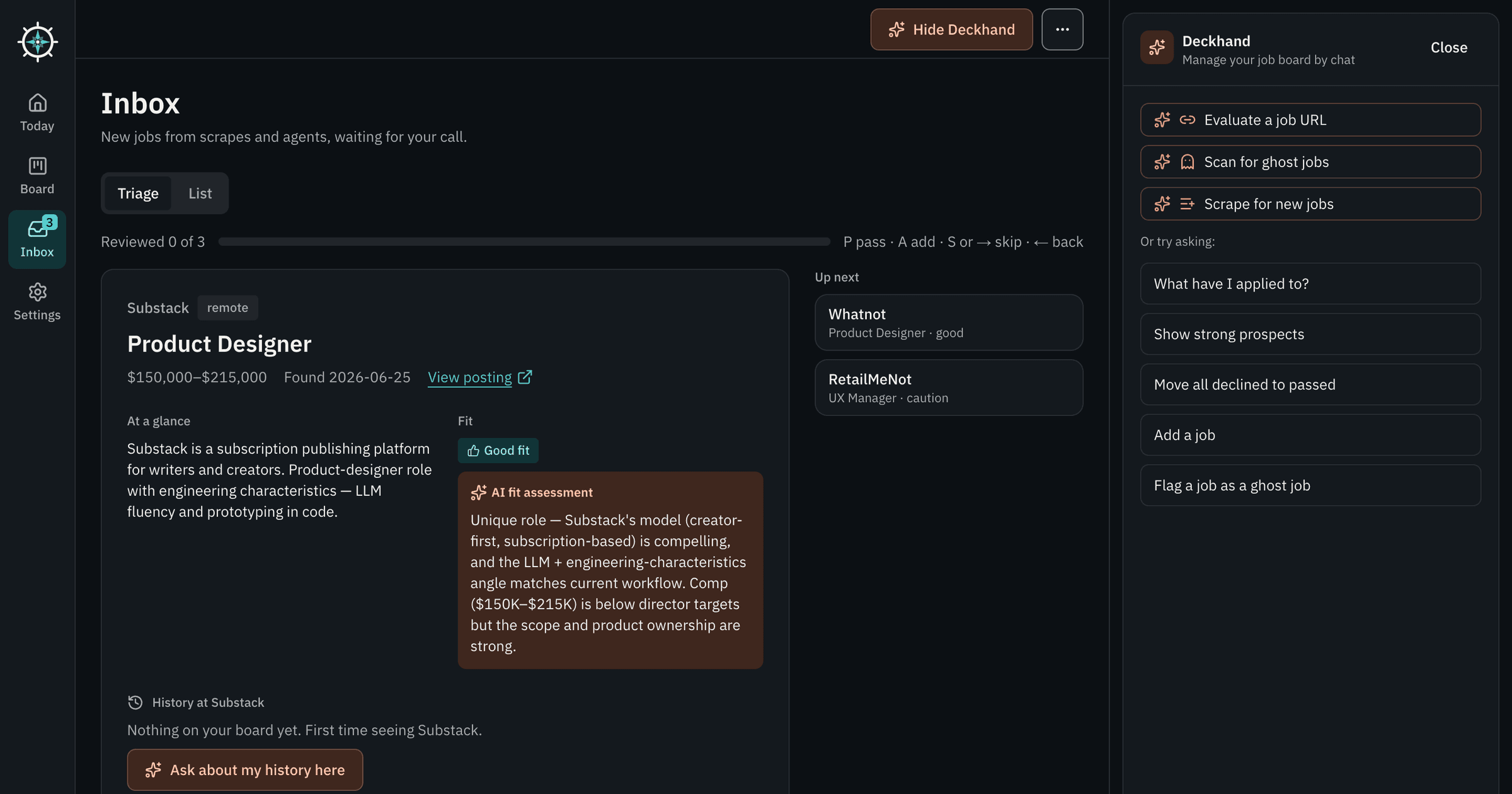
When I last wrote about deckhandAI, the story was a chat assistant that started as an evening experiment. Roughly 70 commits and more than 25 pull requests have landed since. The assistant changed less than everything around it. The board has a new design system and a screen that tells you what to work on today, and other agents can now connect to it.
When the Board Starts Having Visitors
deckhandAI was built so other tools could feed it. The scraper already did, and now your own agents can too. Once several sources add jobs, the gaps show up fast. The inbox sat above the board in the same two-thirds column, so every review competed with whatever else was on screen. Three tables showed jobs three slightly different ways. The assistant lived in a side rail and had no idea which job you were looking at. Nothing was broken. I had built it one feature at a time, and it showed.
One Design System Instead of Many Decisions
I stopped designing screens and wrote the rules first. Teal marks actions and coral marks anything AI. Type, spacing, radii and shadows each come from a small fixed scale, in light and dark. Twenty shared components sit on top, with a /styleguide route that shows them all at once. Then I rebuilt every screen from those parts. The three job tables became one list, and every dialog became the same focus-trapping modal.
I direct an agent instead of drawing each screen, so rules matter more than they used to. One script greps for hard-coded colors. Another tests every text and control pair against WCAG AA in both themes. When the agent drifts from the system, a script tells me before I notice.
Today View Tells You What to Work On
The Today view is not a dashboard of totals. It opens with a short briefing and then lists what needs you. An open offer sits near the interviews you should prepare for, and an application that has gone quiet for five months shows up with its age. Each line has an Ask button that hands it to the assistant. The list is built from the data already on the board.
Triage, One Job at a Time
The inbox changed how the tool feels more than anything else. A list of forty scraped jobs invites skimming, and skimming leads to bad calls. Triage shows one large card with the summary, the fit rationale, the salary and the posting text. You decide from the keyboard. P passes, A adds the job to Prospects, and S skips it. Skipping loses nothing because the queue rotates.
Two small touches made it feel right. A button shows its pressed state the instant you hit a key, which makes you trust the shortcut. A flag beside the company name says whether you have applied to or passed on them before, with that history underneath. That answers a question people would otherwise type into the assistant.
An Assistant That Knows Which Job You Mean
“Ask Deckhand about this job” now appears wherever a job does. It sends the company, role, notes, fit and summary along with the question, so the assistant can assess a job that is not on the board yet. An About chip in the panel shows what it is looking at, and you can clear it.
I also limited the answers. A question like “should I pursue this?” now gets a few short bullets and a one-sentence verdict, under 80 words. An essay is the wrong answer when you are triaging your sixth job in a row. Reading transcripts turned up two other fixes. Replies that hit the length limit now say so instead of ending mid-link, and moving many jobs at once became a single tool call instead of a silent failure. I wrote about that kind of failure in the July article.
Letting Other Agents In, Without Letting Them Delete
If you want agents helping with your job search, they should work on the same board you do, not around it. Anyone running deckhandAI can now connect their own, such as a bot that sources roles or a script that runs on a schedule. The API docs use Grokbot, Muse and Duet as example names. Settings has a new Agents page. Each agent gets its own key, which is shown once and stored only as a hash. You choose its scopes and can revoke it at any time. Agents reach the board through a REST API or an MCP server, and both use the same job rules.
The design decision was what agents cannot do. They can add to the inbox, but never straight onto the board. They can edit a few fields and move or archive a job. There is no delete and no restore. A tool outside an agent's scopes is neither listed nor callable. Every change goes into an append-only event log, and a database trigger records the actor along with the before and after. A bad run is something you can read and undo rather than guess at.
Your Data, Wherever You Keep It
The original pitch was no database. Your jobs lived in a JSON file in a private GitHub repo, and that is still the default and the easiest way to start. A file makes a poor shared store once agents, the scraper and the chat can all write at the same time. So there is now an optional Supabase backend behind one setting, with an import script that does a dry run first. Writes touch only the row that changed, and deleted jobs are soft-deleted so the next scrape does not bring them back.
What I Took From It
Most of these changes came from asking what breaks when more than one source feeds the board. An inbox that fills faster than you can read it invites bad decisions, so I built triage. The agent limits came from picturing the worst run an agent could have and removing the delete button from it.
The full list is on the changelog, and the project is open source on GitHub.
Brian Schwartz
UX & Product Design Leader with 20+ years building design systems, enterprise applications, and high-performing teams across consulting, enterprise, and startup environments.